Editing Paycode Types
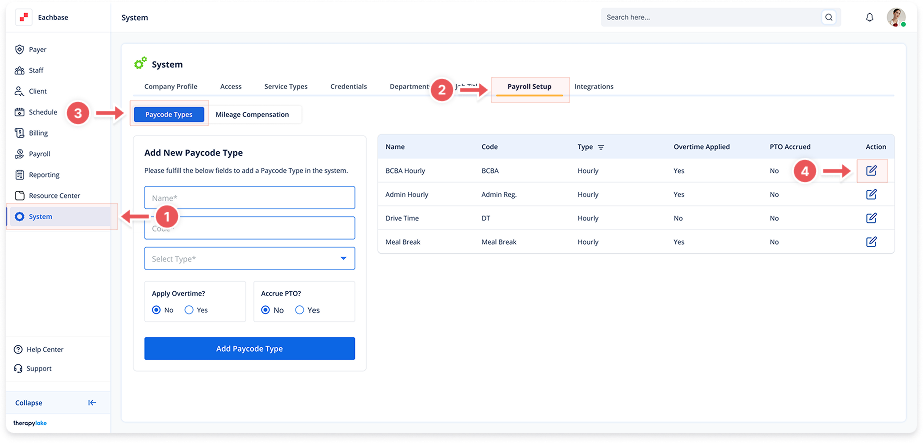
1. Navigate to System
-
Go to the left pane and click > System.
2. Navigate to Payroll Setup Tab
-
Click on the Payroll Setup tab at the top of the page.
3. Select Paycode Types Tab
-
Ensure the Paycode Types tab is selected on the left side.
4. Locate Paycode to Edit
-
Find the paycode type you want to modify in the right table.
-
Click on the blue pencil icon next to the paycode.
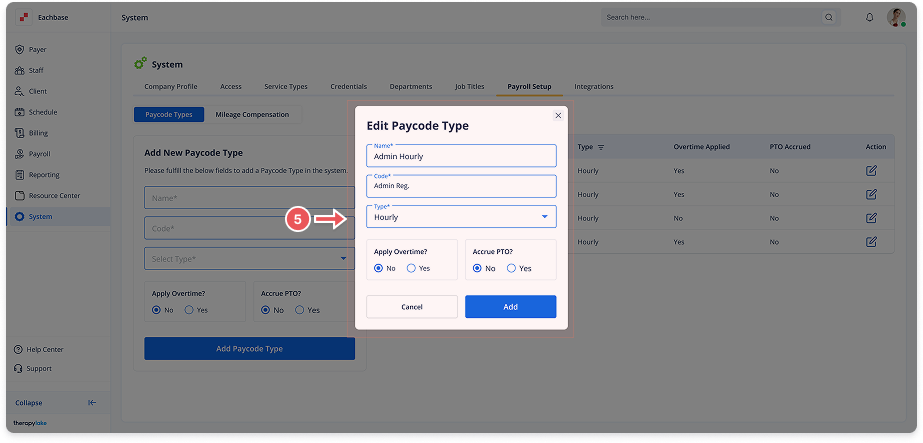
5. Modify Paycode Details
-
Edit any of these fields:
-
Name: Update the paycode name
-
Code: Change the short code
-
Type: Select Hourly or Salary
-
Apply Overtime?: Choose Yes or No
-
Apply PTO?: Choose Yes or No
-
6. Save Changes
-
Click Save to update the paycode type.
🔔 Important Notes
Changes made to a paycode will only affect future payroll calculations and paycodes. Past, already processed paycodes will remain unchanged.