Viewing the Details of a Submitted Claim
1. Navigate to Submitted Claims:
-
Go to the left sidebar and click on Billing > Claims > Submitted Claims.
2. Select a Claim
-
Click on the desired claim from the list to open its details.
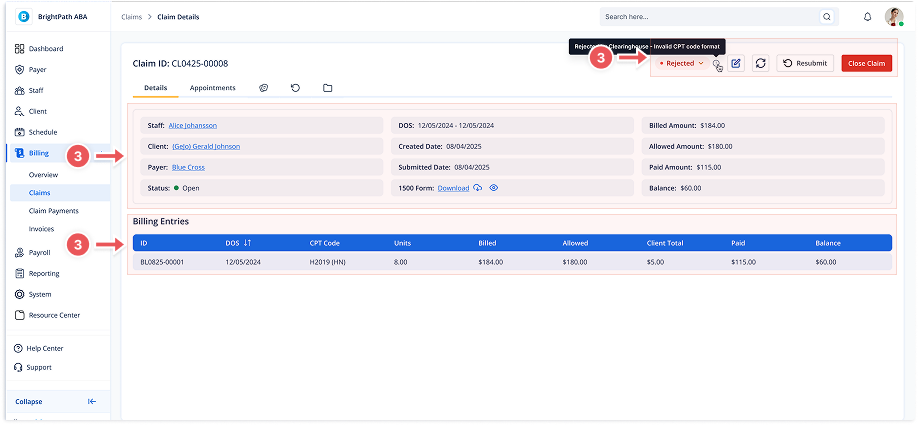
3. Claim Details Page
This page provides complete details for the selected claim.
Basic Claim Info
At the top, you'll see important information, including:
-
Claim ID
-
Status (Open/Closed with current submission status like Accepted or Rejected)
-
Staff, Client, Payer
-
DOS (Date of Service)
-
Created Date
-
Submitted Date
-
Billed Amount, Allowed Amount, Paid Amount, Balance
1500 Form
-
View or download the submitted claim form (CMS-1500) using the Download or Preview icons next to 1500 Form.
Top-right Actions
You can also:
Resubmit the claim
Check Claim Status
Close Claim (available only for claims marked as Paid or Accepted)
Billing Entries Table
A detailed list of billing line items including:
-
ID
-
Date of Service
-
CPT Code
-
Units
-
Billed
-
Allowed
-
Client Total
-
Paid
-
Balance