Viewing Appointments in a Pending Claim
To view all the appointments included in a Pending Claim, follow these steps:
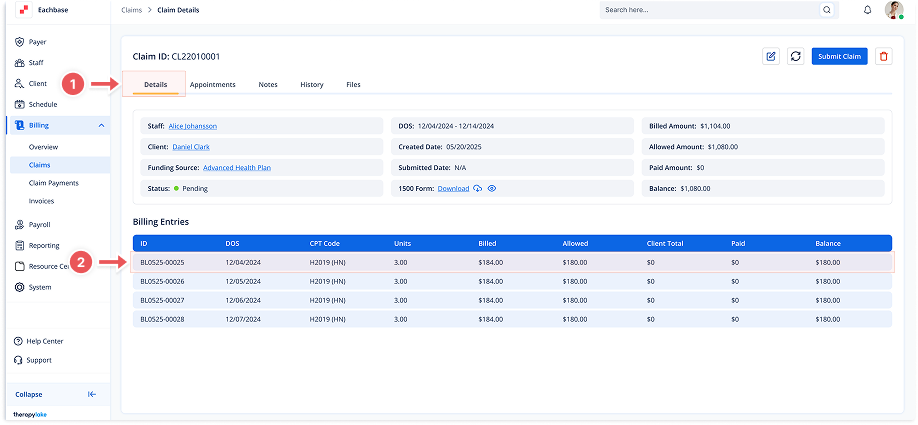
1. Navigate to Pending Claims
-
Go to the left sidebar and click on Billing > Claims > Pending Claims.
2. Select a Claim
-
Click on the desired claim from the list to view its details.
3. Access Bill Details
-
In the Claim Details view, locate the section with billing entries.
-
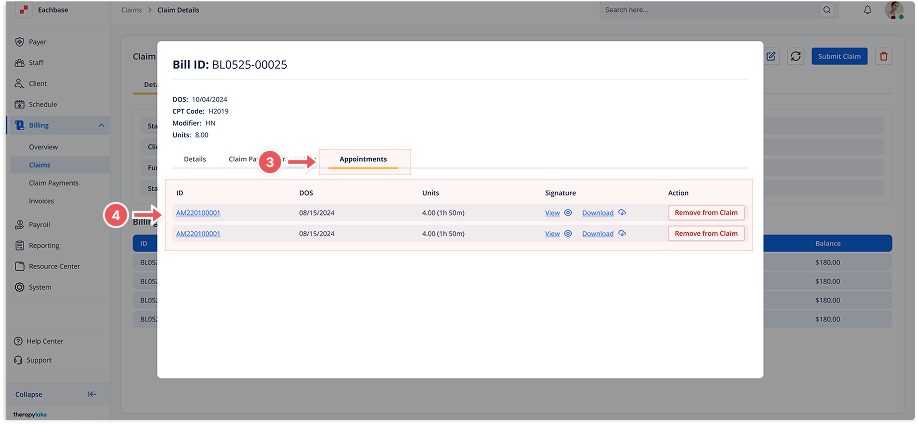
Click on the Billing Entries section to open the Bill Details modal.
4. Select the Appointments Tab
-
Once inside the Claim Details screen, click on the Appointments tab at the top.
5. Review the List of Appointments
-
Here, you will see a list of all appointments associated with the pending claim. The list includes:
-
ID: The unique identifier for each appointment
-
DOS: The scheduled date of the appointment
-
CPT Code (Mod..): The CPT code and any modifiers
-
Units: Units For Appointment
-
Signature: View or Download Signature
-
Action: Remove from claim
-
You can also see appointment details from the Appointments tab on the Claim Details screen.