Viewing Pending Claim List
To view and manage your pending claims:
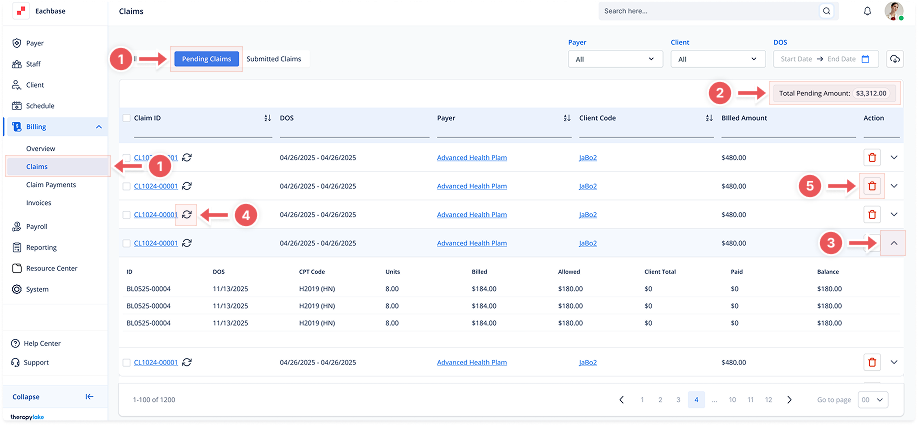
1. Navigate to Pending Claims
-
Go to the left sidebar and click on Billing > Claims > Pending Claims.
2. Understand the Pending Claims List
-
The Pending Claims section shows a temporary list of claims that are awaiting submission or processing.
-
The top right corner now shows a Total Pending Amount calculated across all visible rows.
Each row shows the following:
-
Claim ID
-
Date of Service (DOS)
-
Payer
-
Client Code
-
Billed Amount
3. Expand to View Billing Entries
-
Click the arrow on the right to expand a claim row.
-
You'll see a breakdown of billing entries associated with that claim, including:
-
Entry ID
-
Date of Service
-
CPT Code
-
Units
-
Billed and Allowed Amounts
-
Client Total, Paid, and Balance
-
4. Refresh Claim Data
-
Click the refresh icon next to a Claim ID to update the claim with the most recent billing information.
-
A confirmation modal will appear.
5. Delete a Pending Claim
-
Click the red trash icon under the Action column to delete a pending claim.
-
A confirmation modal will appear. Deleted claims and their related billing data cannot be recovered.