Viewing Bill Details in a Pending Claim (Claim Payment Transactions)
When you are reviewing a pending claim, you can view the bill details associated with the claim, including any transactions related to claim payments.
Steps to View Claim Payment Transactions:
1. Navigate to Pending Claims
-
Go to the left sidebar and click on Billing > Claims > Pending Claims.
2. Select a Claim
-
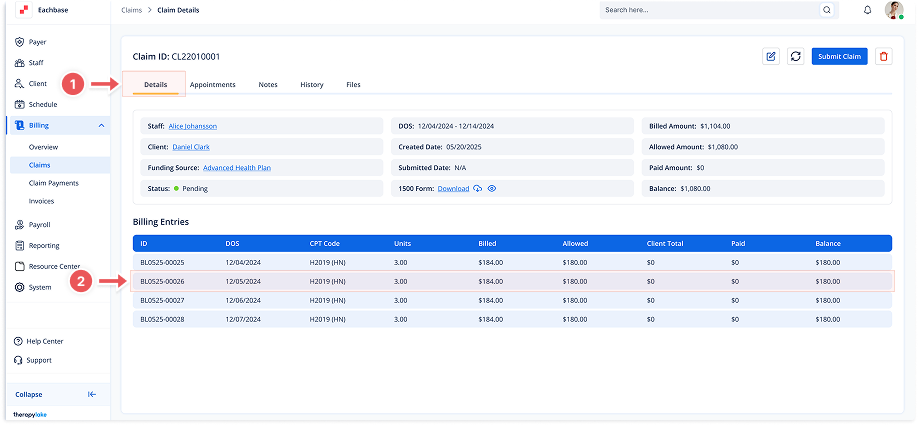
Click on the desired claim from the list to view its details.
3. Access Bill Details
-
In the Claim Details view, locate the section with billing entries.
-
Click on the Billing Entries section to open the Bill Details modal.
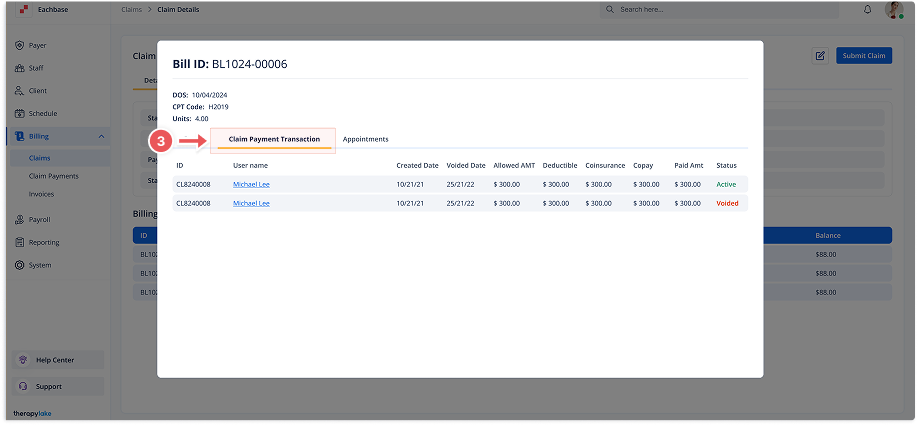
4. View Claim Payment Transactions
-
Click on the Claim Payment Transaction tab to open.
-
This section will display any payment transactions associated with the claim, including:
-
ID
-
Username
-
Created Date
-
Voided Date
-
Allowed Amount
-
Deductible
-
Coinsurance
-
Copay
-
Paid Amount
-
Status
-
-
If there are no transactions, a message will display stating: "No Claim payment transaction yet."