

Clone Authorization
1. Access the Client Section
-
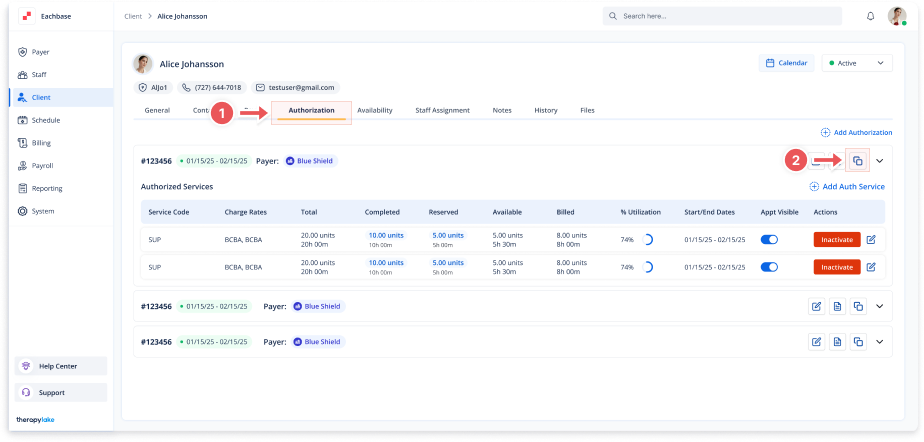
Go to the > Client section in the left panel.
2. Select the Client
-
Choose the client whose authorization you want to clone.
3. Navigate to the Authorization Tab
-
Click on the Authorization tab at the top of the client's page.
4. Select the Authorization to Clone
-
Find the specific authorization you want to clone.
5. Clone the Authorization
-
Click the Clone this Authorization button within the authorization details.
6. Review and Edit Cloned Authorization (Optional)
-
In the Clone Authorization modal:
-
Review the cloned details
-
Make any necessary changes to fields such as:
-
Authorization #
-
Start Date
-
End Date
-
Payer
-
-
7. Save the Cloned Authorization
-
Click the Save button to save the cloned authorization.
8. View the Cloned Authorization
-
The newly cloned authorization will appear under the Authorization tab.