Generating Claims from the Billable Appointment List
To generate claims from billable appointments:
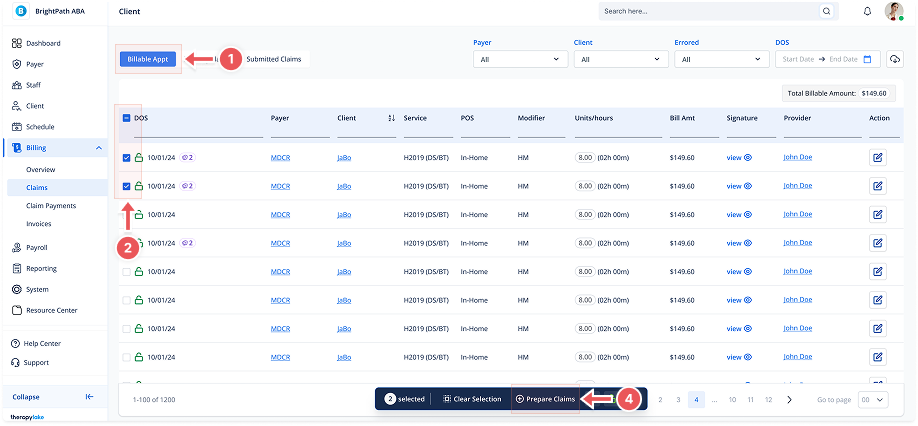
1. Navigate to Billable Appointments
-
Go to the left sidebar and click on Billing > Claims > Billable Appt.
2. Select the Appointment
-
Use the checkboxes on the left side of the appointment list to select one or multiple appointments that you want to include in claims.
-
After selecting, the action bar will appear at the bottom of the page.
3. Review Appointment Information
-
Each row shows important details needed for claim preparation, including:
-
Date of Service (DOS)
-
Payer and Client
-
Service and POS (Place of Service)
-
Modifier
-
Units/Hours and Bill Amount
-
Provider and Signature status
-
4. Prepare Claims
-
In the action bar, click Prepare Claims.
-
The system will automatically generate claims from the selected appointments.
5. Confirmation
-
Once claims are generated, a confirmation toast will appear.
-
The prepared claims will move from the Billable Appointment List to the Pending Claims tab, ready for further review and submission.