Adding a Place of Service
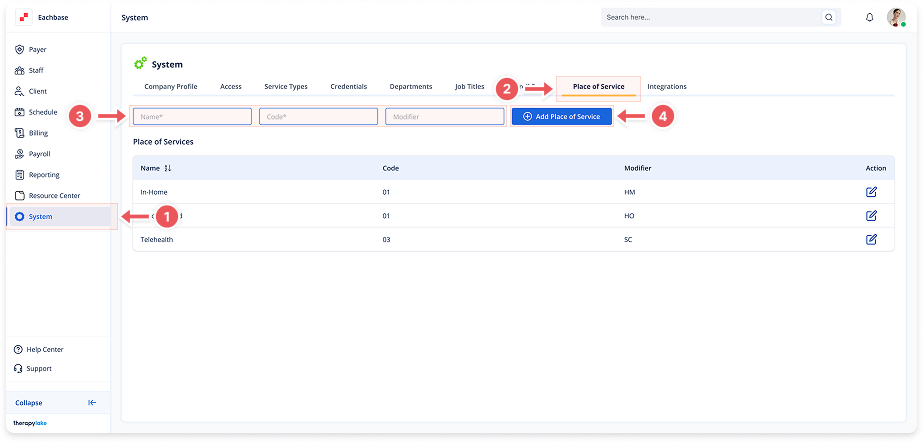
1. Navigate to System
-
Go to the left pane and click > System.
2. Navigate to Place of Service Tab
-
Click on the Place of Service tab at the top of the page.
3. Enter Service Details
-
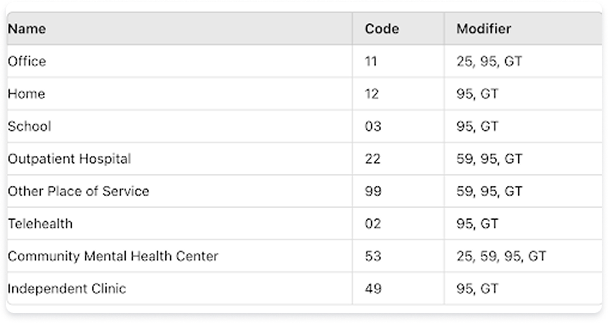
Name: Enter the location name (e.g., "School", "Telehealth", "In Home")
-
Code: Enter the 1500 form code (e.g., "01", "02", "11")
-
Modifier: Enter the 1500 form modifier (e.g., "25", "95", "GT")
4. Add Place of Service
-
Click the blue +Add Place of Service button at top right.
-
The new location will appear in the Places of Service list.
5. Reference Common Examples
-
Below is a sample reference table (verify compliance with your industry regulations):