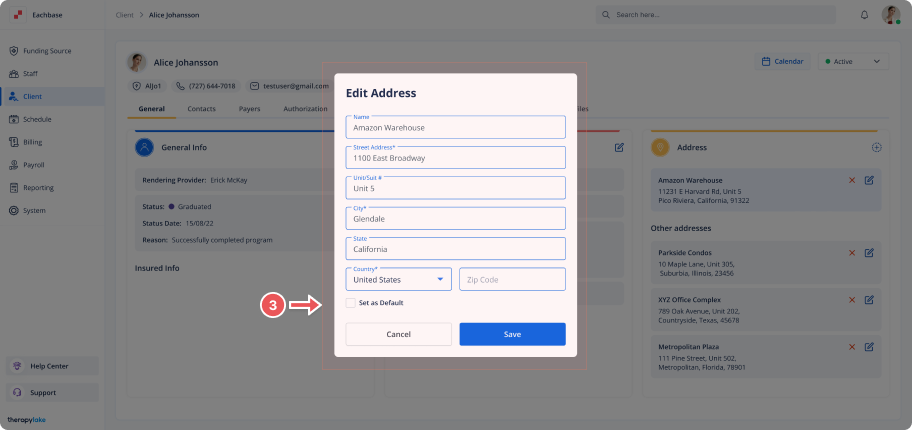
Setting an Address as the Default Address
1. Access the Client Section
-
Go to the > Client section in the left panel.
2. Select the Client
-
Choose the client for whom you want to set a default address.
3. Navigate to the General Tab
-
Ensure you are on the General tab on the client's page.
4. Locate the Address to Set as Default
-
In the Other Addresses section, find the address you wish to set as the default.
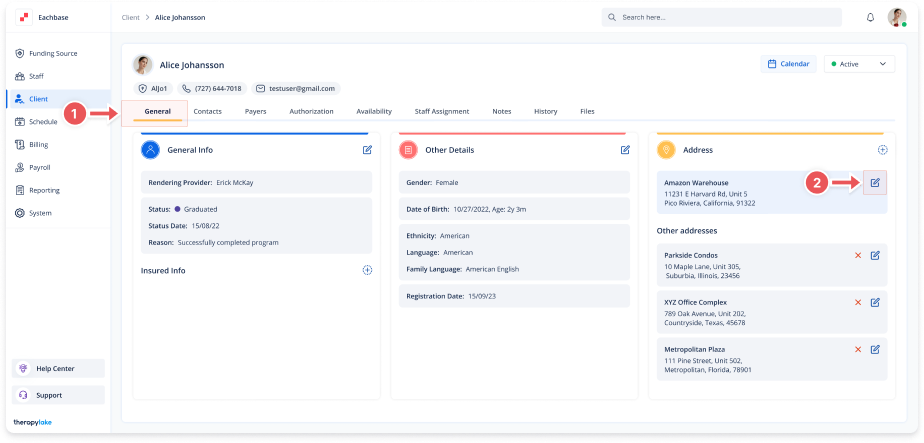
5. Open the Edit Address Modal
-
Click on the pencil icon next to the address you want to set as default.
6. Set the Address as Default
-
In the Edit Address modal, click on the Set as Default checkbox
7. Save the Changes
-
Click the Save button at the bottom of the modal to apply the changes.
8. Review the Default Address
-
The selected address will now appear as the default in the Address section.
The previous default address will move to the "Other addresses" section