Viewing Open Invoice Details
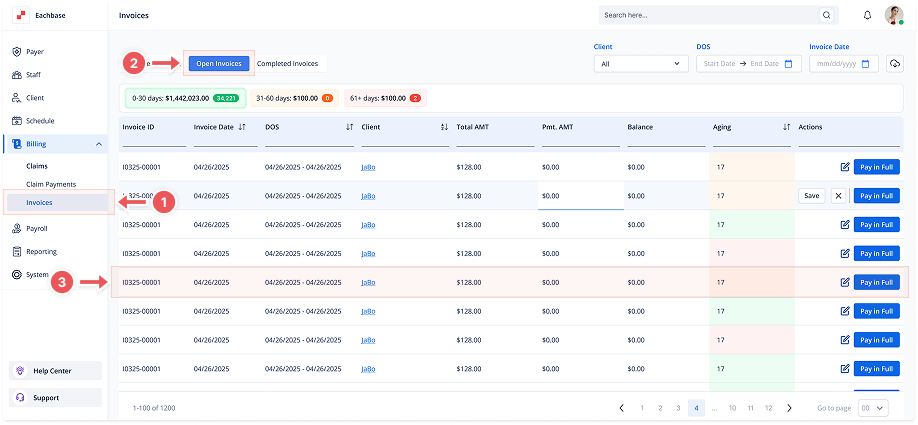
1. Navigate to the Invoices Section
-
Go to the Billing section in the left pane and click on Invoices.
2. Click on the Open Invoices Tab
-
At the top of the page, click the Open Invoices tab to view the list of Open Invoices.
3. Click on the Invoice Line
-
Find the invoice you want to view from the list of invoices.
-
Click on the Invoice ID to open the Invoice Details page.
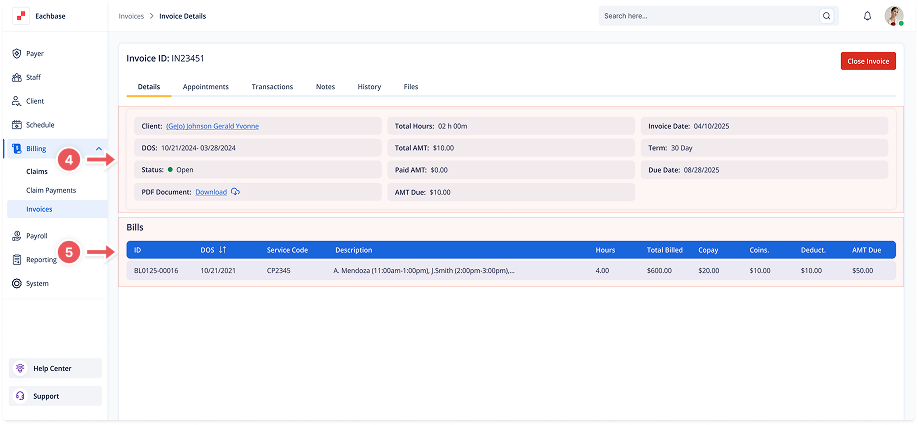
4. View Invoice Details
-
The Invoice Details page will show important information such as:
-
Client and Date of Service (DOS)
-
Total Hours, Total Amount, Paid Amount, and Amount Due
-
Invoice Date, Term, and Due Date
-
The Status of the invoice (Open, Paid, etc.)
-
You can also download the PDF version of the invoice.
-
5. View the Bills
-
The Bills section displays the individual line items for services provided, including Bill ID, Dos, Service Code, Description, Hours, Total Billed, Copay, Coinsurance, Deductible, and Amount Due.