Adding Notes to an Invoice
1. Navigate to the Invoices Section
-
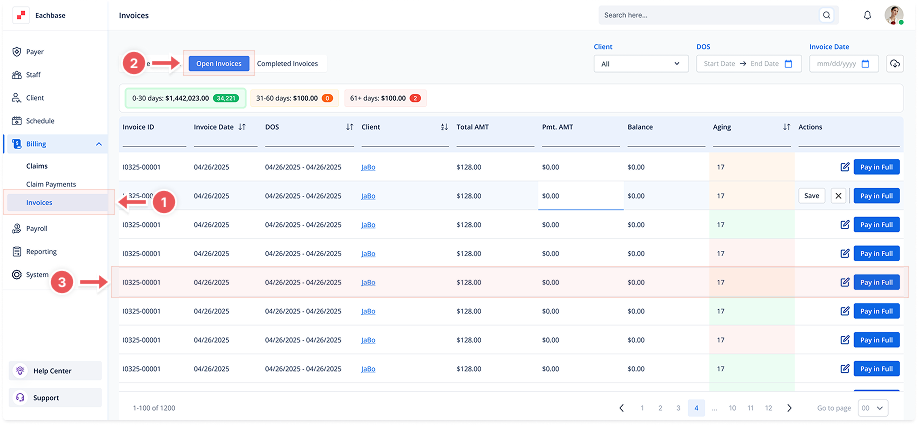
Go to the Billing section in the left pane and click on Invoices.
2. Click on the Open Invoices Tab
-
At the top of the page, click the Open Invoices tab to view the list of Open Invoices.
3. Open the Invoice Details
-
Click anywhere on the invoice line to open its details.
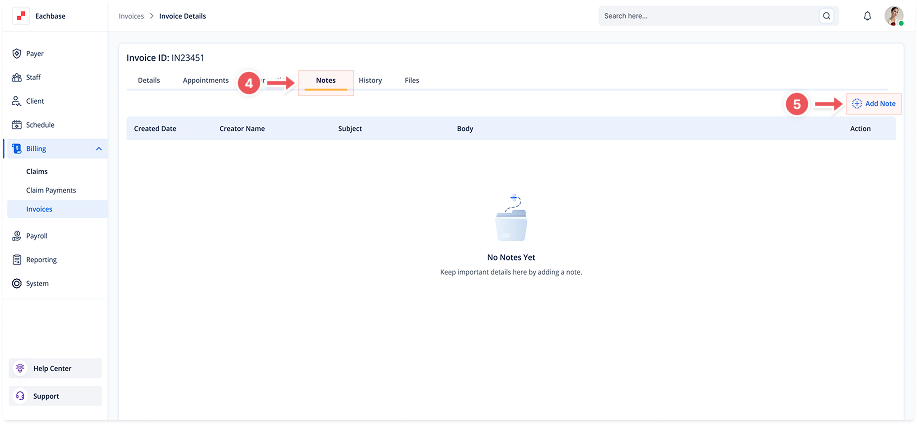
4. Go to the Notes Tab
-
Once inside the invoice details, select the Notes tab.
5. Click the Add Note Button
-
In the top-right corner of the Notes tab, click the + Add Note button.
6. Fill in the Note Details
-
A modal will appear. Enter the Subject and Body of the note.
7. Save the Note
-
Click the Add button to add the note to the invoice.