Viewing Active Timesheet Details
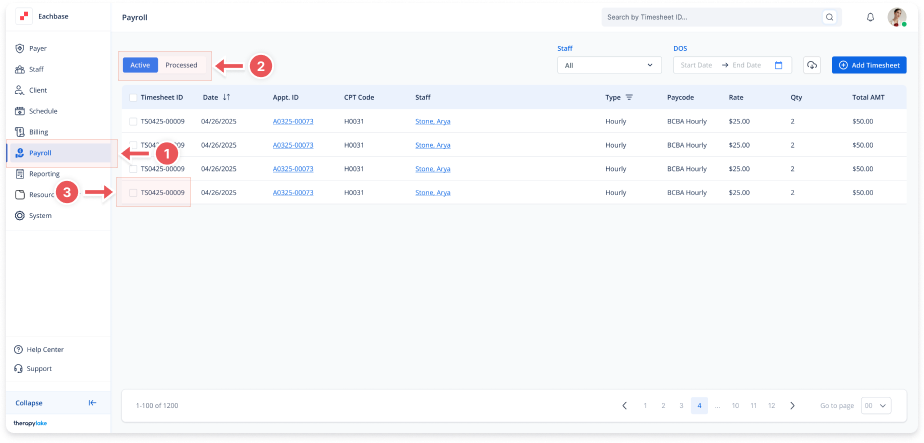
1. Navigate to the Payroll Section
-
On the left-side panel, click Payroll.
2. Select Active Timesheets
-
Select the Active tab at the top left.
3. Locate the Timesheet
-
In the list of timesheets, find the specific timesheet you want to view.
4. Click on the Timesheet ID
-
Click the Timesheet ID in the first column to open the details for that timesheet.
5. View Details
-
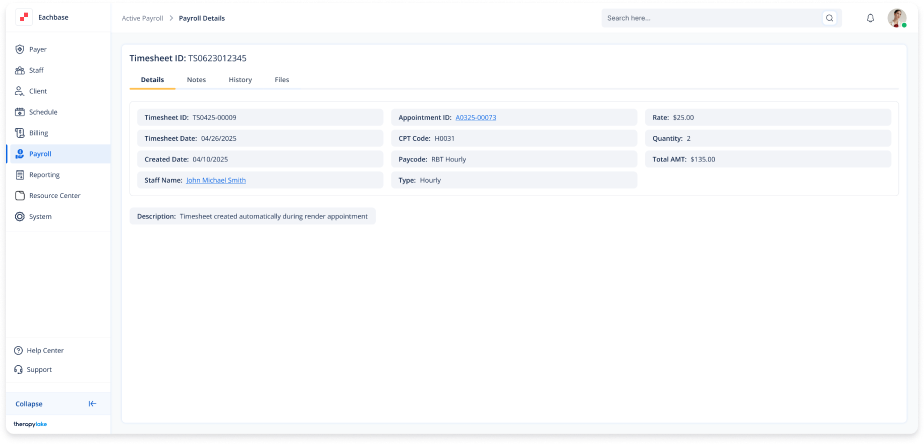
You will be directed to the Details tab by default, where you can see:
-
Timesheet ID
-
Timesheet Date
-
Created Date
-
Staff Name
-
Appointment ID
-
CPT Code
-
Paycode
-
Type
-
Rate
-
Quantity (Qty)
-
Total Amount (AMT)
-
Description
-