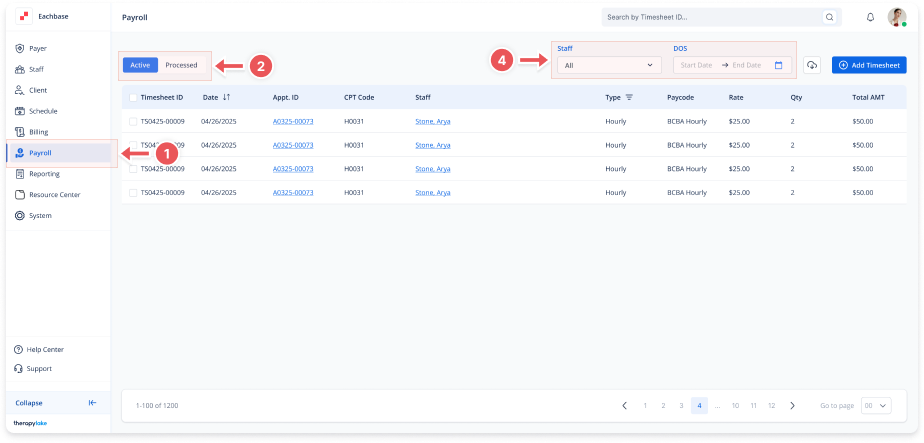
Viewing Active Payroll Timesheets List
1. Navigate to the Payroll Section
-
On the left-side panel, click Payroll.
2. Select Active Timesheets
-
Select the Active tab at the top left.
3. Understand the Columns
-
Timesheet ID: The unique identifier for each timesheet.
-
Date: The date the service or work was completed.
-
Appointment ID (Appt ID): The identifier for the associated appointment.
-
CPT Code: Standardized codes used to describe and bill for services.
-
Staff: The name of the staff member linked to the timesheet.
-
Type: Indicates whether the timesheet is Hourly or Fixed.
-
Paycode: Designates how the staff member is compensated for specific services.
-
Rate: The hourly or fixed pay rate.
-
Quantity (Qty): The number of units worked, such as hours or miles.
-
Total Amount (Total AMT): The total payment amount for the timesheet.
4. Sorting and Filtering
-
Date can be sorted in ascending or descending order.
-
Type can be filtered to show specific types of entries.
5. Review the Timesheets
-
Review the list of timesheets, which can span multiple pages.