Un-process Payroll
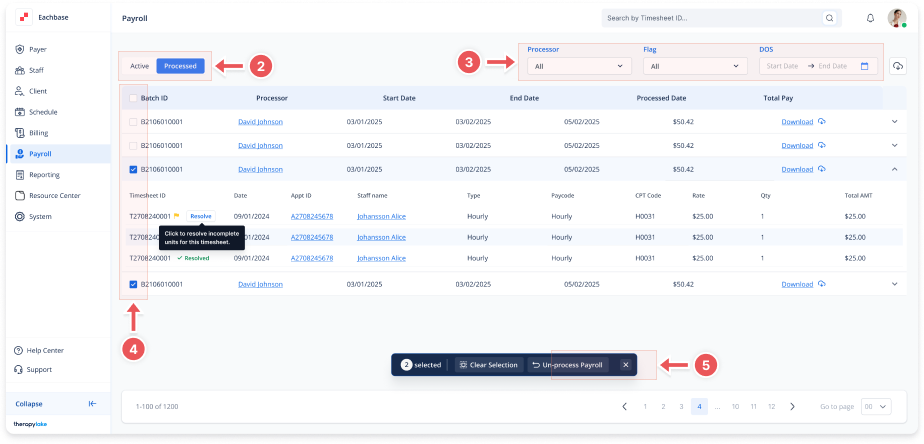
1. Navigate to the Payroll Section
-
On the left-side panel, click >Payroll.
2. Select Processed Timesheets
-
Select the Processed tab at the top left to view the list of processed payroll batches.
3. Filter if needed
-
Use the Processor, Flag, or Date filters at the top to narrow your list.
4. Select timesheets
-
From the list, check the timesheets you want to unprocess.
5. Click Un-process Payroll
-
Click the Un-process Payroll button in the action bar at the bottom.
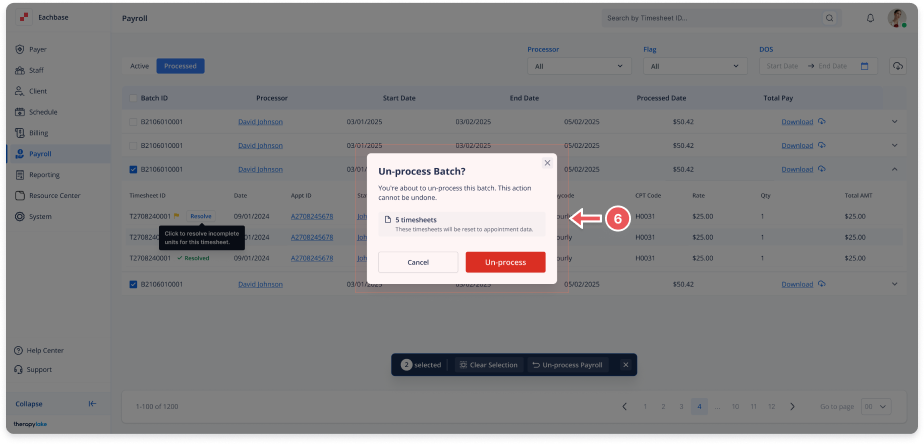
6. Confirm the Action
-
After clicking Un-process Payroll, a confirmation modal will appear.
-
Review the selected timesheets, then click Confirm to complete the action.
-
The selected timesheets will be moved back to the Active tab.