Editing Client Notes
1. Access the Client Section
-
Go to the > Client section in the left pane.
2. Select the Client
-
Choose the client whose note you want to edit.
3. Navigate to the Notes Tab
-
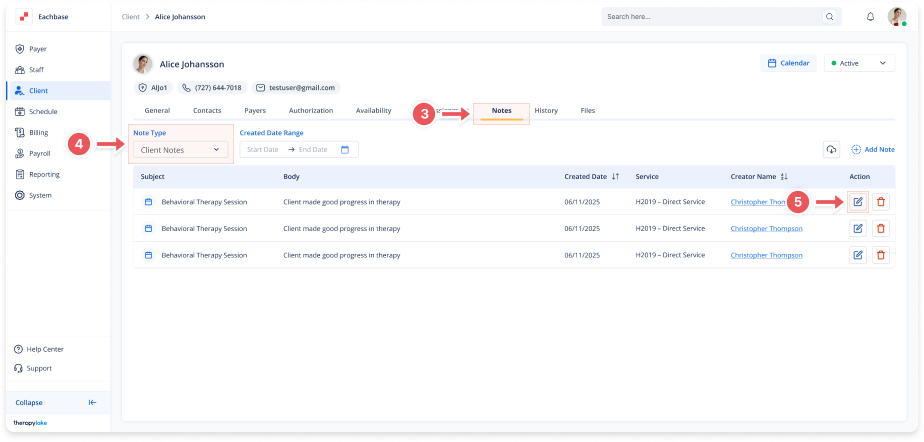
Click on the Notes tab at the top of the client's page.
4. Select the Note Type
-
Make sure the Note Type dropdown is set to Client Notes.
5. Edit a Note
-
Find the note you want to edit and click the pencil icon under the Action column.
6. Make Changes to the Note
-
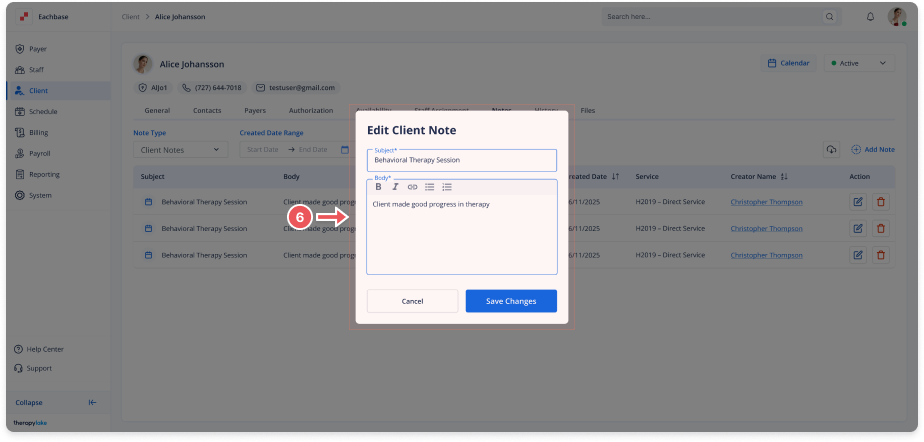
In the Edit Note modal, update the Subject or Body fields as needed.
7. Save Changes
-
Click Save to apply your changes.
-
The note will be updated in the table.