

Editing Authorized Service Separately
1. Access the Client Section
• Go to the > Client section in the left panel.
2. Select the Client
• Choose the client whose authorized service you want to edit.
3. Navigate to the Authorization Tab
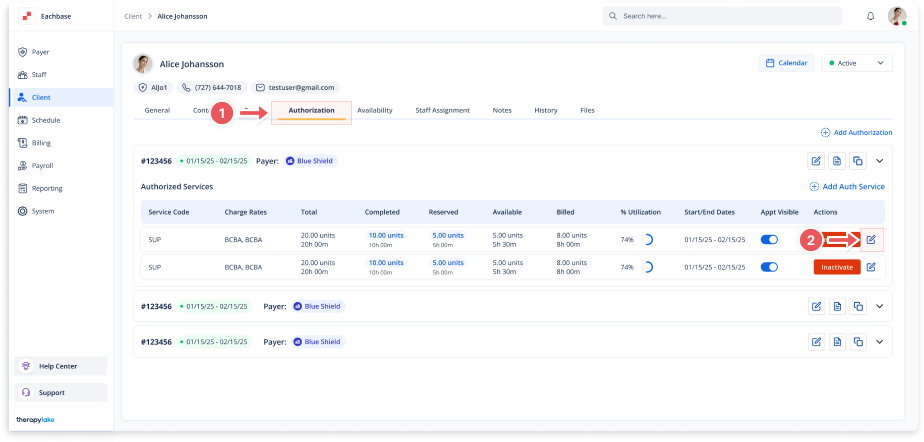
• Click on the Authorization tab at the top of the client's page.
4. Select the Authorization
• Find the specific authorization that contains the authorized service you want to edit.
5. Locate the Authorized Service to Edit
• Under the Authorized Services section, find the service you want to edit.
6. Edit the Authorized Service
• Click on the pencil icon next to the authorized service in the Action column to open the Edit Authorized Service modal.
7. Update Service Details
• Make the necessary changes to fields such as:
-
Service Code
-
Charge Rates
-
Total Units
-
Start Date
-
End Date
-
Frequency Limits
8. Save Changes
• Click the Save button at the bottom right of the modal to apply the changes.
9. Review Updated Authorized Service
• Ensure the updated authorized service details are correctly reflected in the Authorized Services table.
🔔Notes
- You can edit authorized services either within the Edit Authorization modal or separately.
- Ensure all changes are accurate before saving to avoid discrepancies in billing or service tracking.