Adding a Fixed Pay Timesheet
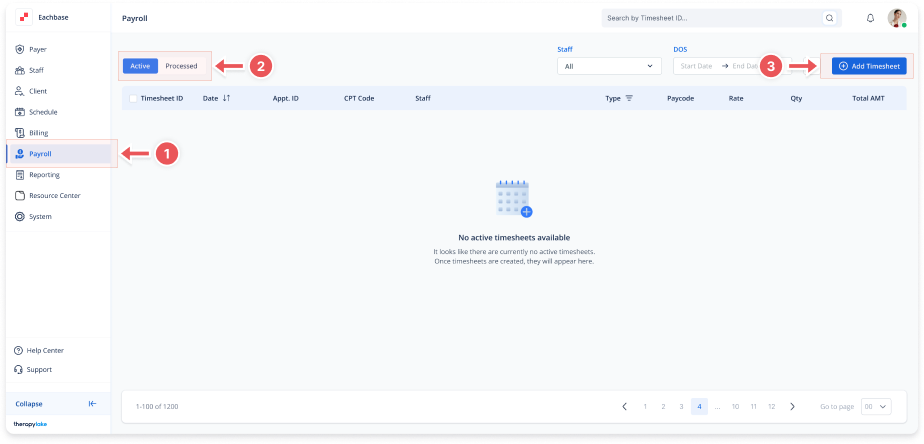
1. Navigate to the Payroll Section
-
On the left-side panel, click Payroll.
2. Select Active Timesheets
-
Select the Active tab at the top left.
3. Add a Timesheet
-
In the top-right corner of the page, click on the Add Timesheet button.
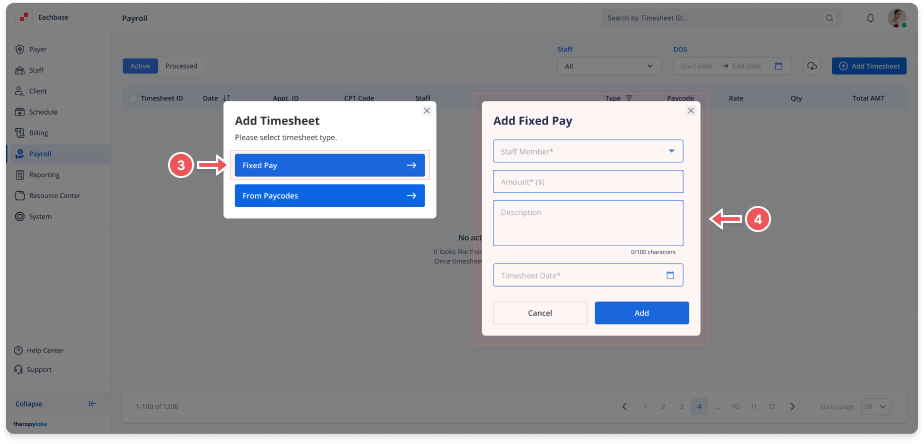
4. Select Fixed Pay Timesheet Type
-
In the modal that pops up, choose the Fixed Pay option.
5. Fill in Timesheet Information
-
Staff Member: Select the staff member for whom you are adding the timesheet.
-
Amount ($): Enter the fixed pay amount.
-
Description: Optionally, add a description for the timesheet.
-
Timesheet Date: Select the date the timesheet is associated with.
6. Save the Timesheet
-
After entering all the required information, click Add to save the fixed pay timesheet.
7. View the Added Timesheet
-
The new timesheet will now appear in the Active timesheet table.