

Editing Authorization
Overview
This guide explains how to edit an authorization and its associated authorized services.
You can edit authorized services directly within the authorization modal or separately.
1. Access the Client Section
-
Go to the > Client section in the left panel.
2. Select the Client
-
Choose the client whose authorization you want to edit.
3. Navigate to the Authorization Tab
-
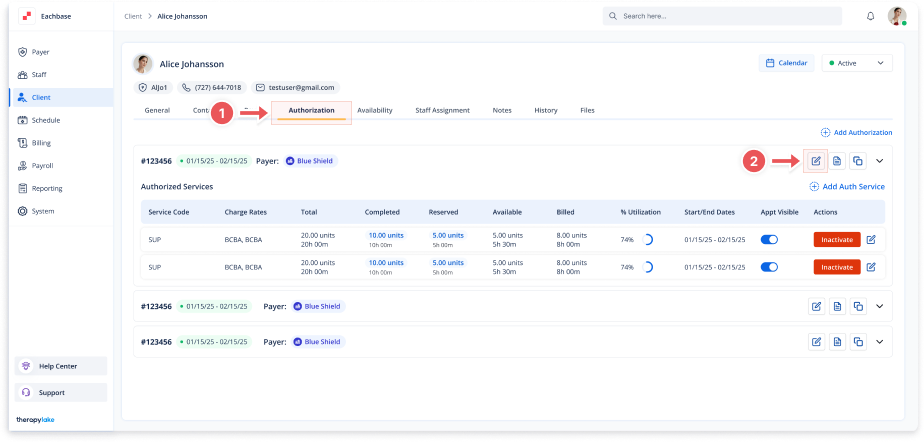
Click on the Authorization tab at the top of the client's page.
4. Select the Authorization to Edit
-
Find the specific authorization you want to edit.
5. Open the Edit Authorization Modal
-
Click on the pencil icon next to the authorization in the Action column to open the Edit Authorization modal.
6. Update Authorization Details
-
Make the necessary changes to fields such as:
-
Authorization #
-
Start Date
-
End Date
-
Payer
-
7. Edit Authorized Services (Optional)
-
Within the Edit Authorization modal, you can also edit authorized services:
-
Click on the pencil icon next to the authorized service to update fields like:
-
Service Code
-
Charge Rates
-
Total Units
-
Start Date
-
End Date
-
Frequency Limits
-
-
8. Save Changes
-
Click the Save button at the bottom right of the modal to apply the changes.
9. Review Updated Authorization
-
Ensure the updated authorization and authorized service details are correctly reflected in the Authorizations table.